OnePlus Nord CE review: Meaningful increments but weak on core competency

In the first half of this year, smartphone makers have launched more midrange smartphones than premium and budget ones put together. So, it will not be wrong to say the midrange segment is the new battlefield for smartphone brands in India’s price-conscious mobile phone market. Fresh in the segment is the Nord CE (Core Edition) by OnePlus. In retrospect, this Chinese smartphone brand brought the midrange smartphones back in trend in 2020 with the launch of the OnePlus Nord (review). The brand enjoyed the first-mover advantage and the Nord received a healthy reception despite its shortcomings.

That was the background. Now let us dig right into the OnePlus Nord CE review to know if it fits the bill, especially when there are so many good options available now in the midrange segment:

The OnePlus Nord CE is positioned not as a successor but the core edition based on the original Nord. The smartphone seems to have cut corners on some parameters to help OnePlus price it lower than the Nord, though not significantly. It will, however, be wrong to call the Core Edition as a trimmed-down version of the Nord because it also comes with several upgrades.Design

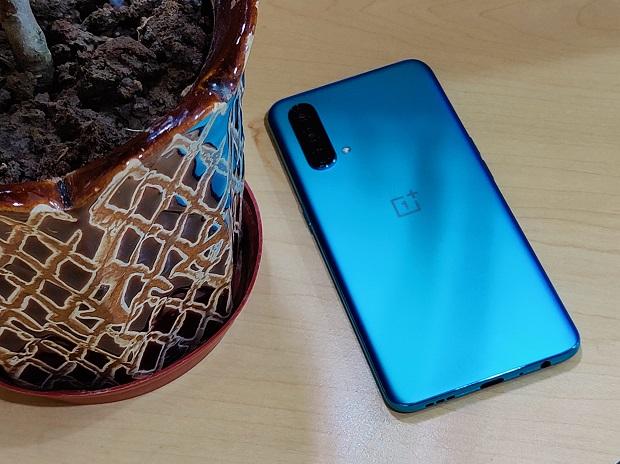
The OnePlus Nord CE looks similar to the Nord but has a modest plastic back cover in place of the latter’s premium glass one. The plastic build is sturdy, so that’s no concern, but the design language is reminiscent of the Nord, which is a generation old now, and even some OPPO and Realme smartphones. That is a red flag. Besides, OnePlus has taken away its proprietary alert slider from the Nord CE. The alert slider is one thing that has always been part of OnePlus smartphones. The omission for the sake of sticking to the core features will have a negative impact on user experience, especially if you are an existing OnePlus user.

Read Complete Article

How-to stop ironSource from installing, recommending apps on Samsung phones

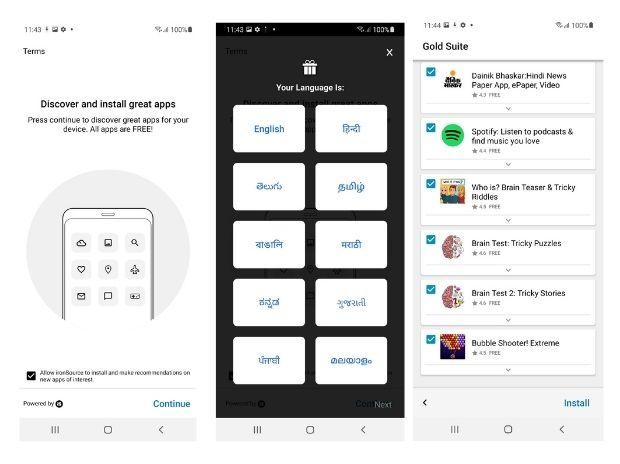
South Korean electronics maker Samsung uses Israel-based app monetisation platform ‘ironSource’ in its budget and midrange smartphone to install multiple third-party apps during the set-up process. This platform slips bloatware on the pretext of recommended apps, leading to apps clutter and reduction in on-board storage space. Here is how-to disable the ironSource platform from installing apps and sending apps recommendation notifications on Samsung smartphones:

Step 1: Set-up the phone normally until you reach the window that says ‘You’re all set up!’

Step 2: On the next screen you will see the ‘Experience Samsung services’ window with a disclaimer on the bottom side stating ‘By tapping agree, I agree to Samsung services (Glance on Samsung, My Galaxy, Galaxy Store, Search within popular apps and Discover) terms and conditions and privacy policy).’ The disclaimer is followed by agree button. On this window, tap on the disclaimer portion marked in bold font to get to the next window to disable permissions for individual settings.

Step 3: On this window, uncheck the Glance on Samsung to not see photos downloaded over internet on the lock screen. To disable apps recommendation notifications, uncheck the Discover. Once done, tap on apply to save permissions.

Step 4: Now, click agree to go to next window that asks for language selection. Click on preferred language and tap on next to go to the next window.

Step 5: On this window, the ironSource platform asks for user permission to install and make recommendations on new apps of interest.

Uncheck to disable the ironSource platform from installing apps or to send apps recommendation notifications. Click continue to go to the next window.

Step 6: On this window, the ironSource platform asks for details like gender and age group. You can skip this part to move to the next window.

Read Complete Article

Elon Musk’s SpaceX launches 88 satellites as part of ‘ride-share’ mission

Tech billionaire Elon Musk’s space company Spacex has launched 88 satellites, as part of the firm’s second in-house “ride-share” mission from Florida, bringing the total number of orbital objects this year to nearly 900, the media reported.

The company launched the satellites on Wednesday on a reused Falcon 9 rocket for the “Transporter-2” mission, including the first five for a new Pentagon agency and dozens more for various companies, countries, and schools, the Verge reported.

On Wednesday, June 30 at 3:31 p.m. EDT, Falcon 9 launched the Transporter-2, SpaceX’s second dedicated SmallSat Rideshare Programme mission, from Space Launch Complex 40 at Cape Canaveral Space Force Station in Florida, the company said.

The mission also marked SpaceX’s second launch to a polar orbit from Florida. This marked the company’s 20th launch this year and the eighth flight for the rocket’s first stage booster. That booster returned to Earth about 10 minutes later at SpaceX’s Landing Zone 1.

On board this launch were 85 commercial and government spacecraft (including CubeSats, microsats, and orbital transfer vehicles) and three Starlink satellites.

The Transporter-1 mission, in January this year, set up a new record for most satellites — it sent up 143 satellites. The Transporter-2 mission, however, launched more mass to orbit overall,the company said.

The Transporter launches, first announced in 2019, are part of the company’s rideshare business model.

The Transporter-2 mission includes nearly 10 customers, some of whom are launch service providers who are themselves organizing customer payloads — like Spaceflight, which is launching 36 small satellites on behalf of 14 customers, as well as its electric propulsion vehicle dubbed Sherpa-LTE, the TechCrunch reported.

Read Complete Article

TCL expands its range of QLED 4K TVs, launches India’s first Mini LED 4K TV

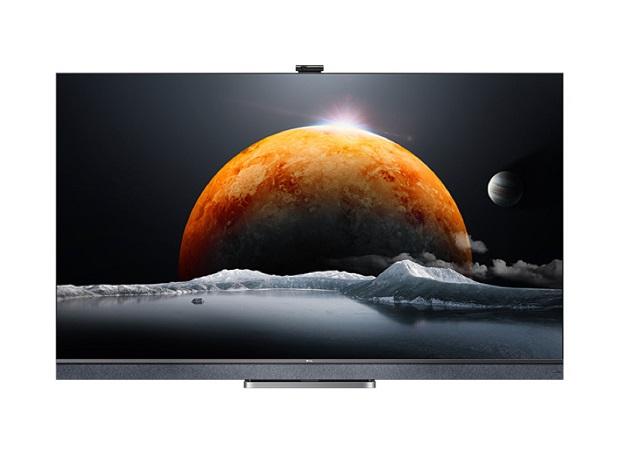
China’s consumer electronics maker TCL on Wednesday launched in India its C-series of 4K QLED smart televisions, including the country’s first Mini LED 4K QLED TV. Based on Google’s Android 11 TV platform, the C-series include Mini LED QLED 4K C825 with Magic Camera, QLED 4K C728 with Game Master, and QLED 4K C725 with video call camera. The models boasts 120Hz MEMC, Dolby Vision, Dolby Vision IQ, Dolby Atmos, IMAX Enhanced, Game Master, Hands-free voice control 2.0, and TCL Smart user interface. The TCL C-series smart 4K QLED TVs will be available exclusive at TCL Store India.TCL Mini LED QLED 4K Android 11 TV C825: Price and features

The TCL Mini LED QLED 4K TV C825 will be available in 55-inch and 65-inch screen variants priced at Rs 114,990 and Rs 149,990, respectively. The Mini LED QLED 4K C825 boasts full array local dimming technology for enhanced contrast and colour accuracy. The TV supports Dolby Vision high dynamic range (HDR) and Dolby Vision IQ. The TV’s screen panel supports 120Hz MEMC powered by TCL’s proprietary software algorithm. For gamers, the TV has HDMI 2.1 port compatible with latest generation gaming consoles like the Sony PS5 and Microsoft Xbox Series X. The TV supports a magnetic magic camera (1080p) for video calls powered by Google Duo and Zoom Meet. As for the audio, the TV features IMAX Enhanced certified 2.1 channel ONKYO Soundbar with Dolby Atmos.TCL QLED 4K Android 11 TV C725: Price and features

The TCL QLED 4K C725 will be available in 50-inch, 55-inch and 65-inch screen variants priced at Rs 64,990, Rs 72,990, Rs 99,999, respectively. The TCL QLED 4K C725 supports video call camera for video calling through Google Duo. Like the Mini LED QLED 4K, the TCL QLED 4K C725 supports Dolby Vision and HDR10+. It also supports MEMC and has HDMI 2.1 port. The TCL QLED 4K C725 has an integrated ONKYO-certified soundbar with Dolby Atmos.TCL QLED 4K Android 11 TV C728: Price and features

The TCL QLED 4K TV C728 will be available in 55-inch, 65-inch and 75-inch screens priced at Rs 79,990, Rs 102,990 and Rs 159,990, respectively. Aimed at gamers, the TCL QLED 4K TV C728 is backed by TCL’s Game Master supported by HDMI 2.1. Besides, the TV boasts Variable Refresh Rate (VRR), Auto Low Latency Mode (ALLM), HDMI eARC, and the company’s proprietary software algorithm for improved gaming experience. The TCL QLED 4K TV C728 supports Dolby Vision, Dolby Vision IQ, Dolby Atmos, 120Hz MEMC and hands-free voice control.

Read Complete Article

Asus Zenbook Duo 14 UX482 review: Superb for creators, not so for writers

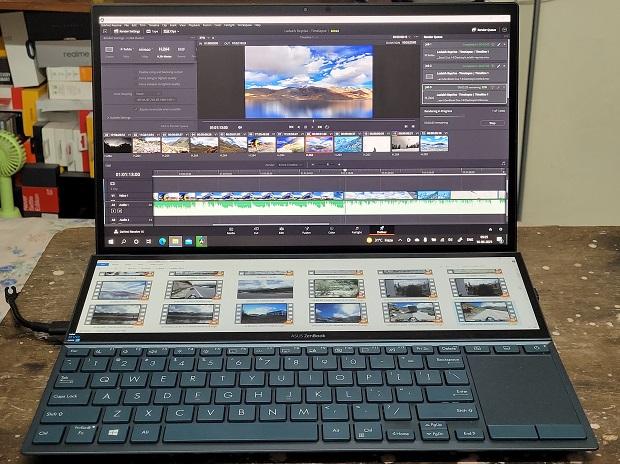
Asus has a wide portfolio of consumer laptops, some with a radical form factor and unique design language. Take for example the recently launched Asus Zenbook Duo 14 UX482. Aimed at content creators, the laptop is a one-of-its-kind device with two screens – a full-fledged 14-inch fullHD resolution LED backlit touchscreen and a 12.65-inch IPS-level touchscreen of 1080 x 515 pixel resolution. The Asus Zenbook Duo 14 UX482 might not be the only laptop featuring a dual-screen but the implementation of a secondary screen here is practical and useful in more ways than one.

The second screen is connected to the primary screen through Windows Project. It means this one is no gimmick and can be used like any other second screen – you can duplicate the primary screen content on the secondary screen or use both together for an extended view. Besides, it is not necessary to always use both screens as each can be switched off independently. So, the basics are covered right.

As for utility, the second screen adds extra space which comes in handy to fit additional content that would otherwise be hidden behind the primary window or rest minimised on the taskbar. For example, you can open a Microsoft Word file on the second screen and a web browser on the primary one. Asus has done a thorough job to make the second screen as good as the primary one. The second screen supports split-view, just like the primary screen. Therefore, you can fit at least four windows (two on primary and two on secondary) and multitask without using the Alt+Tab key combination frequently.

Complementing the dual-screen set-up is the Asus ScreenXpert software, which gives the second screen some extra power. This software is available in the form of dock, which is like a taskbar but a powerful one. It can be placed on the left, right or bottom side of the second screen, and can auto-hide when not in use. Through this dock, you can adjust the brightness of the second screen, navigate open applications on both screens, enable/disable the physical keyboard, and manage other settings applicable to the second screen.

Through this software, the second screen can be used as a trackpad and for handwriting content.

The best use for the ScreenXpert software, however, is for content creators through its Control Panel. It turns the ScreenPad Plus into a customisable control deck, giving you sliders, wheels and buttons for commonly used tasks in the Adobe application suite – Photoshop, Premiere, After Effects and Lightroom. This feature scales the utility of the second screen for content creators all the way north.

Read Complete Article

Google restores YouTube, Gmail services after multiple users face outage

(Reuters) -Multiple users complained about an outage affecting Alphabet Inc’s search engine Google as well as its streaming and email services late Monday before services were restored, according to outage monitoring website Downdetector.

Platforms including Google, YouTube, and Gmail were down, with users citing issues with login and accessing the website in parts of North America, according to Downdetector.

More than a thousand users were having difficulties with the search engine at one point, the outage monitoring website showed, and users were also facing issues with YouTube TV and Google Drive.

Reports of Google outage on Downdetector have dropped significantly to single digits early Tuesday.

The issue affecting the platforms was not immediately clear.

Google did not immediately respond to a Reuters’ request for comment after business hours.

Downdetector tracks outages by collating status reports from a series of sources, including user-submitted errors on its platform.

(Reporting by Aakriti Bhalla in Bengaluru; Additional reporting by Radhika Anilkumar; Editing by Amy Caren Daniel and Sherry Jacob-Phillips)

Read Complete Article

JBL CSUM10 review: Inexpensive compact USB microphone for content creators

The JBL CSUM10 is an affordable dual-capsule condenser type USB microphone. Priced at Rs 5,799, this plug-and-play microphone seems to be a good fit for budding content creators to record professional quality audio without actually paying much for it. Starting with the design, the JBL CSUM10 looks visually appealing with its minimal all-metal body. It is not often that we get a solid microphone stand in the entry-level segment but the JBL CSUM10 comes with a sturdy metal desktop stand for stable and balanced fit. Additionally, it can be mounted on the boom stand (sold separately).

As for the controls, there are two knobs on the front — one for volume control and the other one to adjust the voice. Below the knobs, there is a mute button to quickly cut the microphone input. This comes handy if you are using the mic for virtual conference, streaming, etc. There are two ports on the bottom side — a USB-C port to connect it with the laptop and a 3.5mm jack to connect earphones. Being a plug-and-play device, the JBL CSUM 10 is easy to set-up and use — there is no hassle of installing drivers.

Coming on to the microphone performance, the JBL CSUM10 has two modes — omnidirectional (captures sound equally from all directions), and cardioid for a 180-degree recording field. The multi-recording microphone modes are hard to find in budget microphones, and these put the JBL CSUM10 a few notches above the others – at least on paper. In real life, the microphone is effective in recording voice when set to omni mode but struggles in cardioid mode. Moreover, the microphone is sensitive and it picks even the background noise irrespective of the recording mode you use in.

Read Complete Article

Sony SRS-XB13 review: Impressive portable wireless speaker for music

Sony is one brand that understands the audiophiles’ nerve and it shows in its products, including the tiny portable wireless speakers. The Japanese technology company recently expanded its audio range in India with the launch of the Sony SRS-XB13 portable wireless speaker. Successor to the Sony SRS-XB12, the Sony SRS-XB13 brings minor but relevant upgrades over the predecessor. But how does it fare in terms of price-performance ratio? Let’s find out:

Design

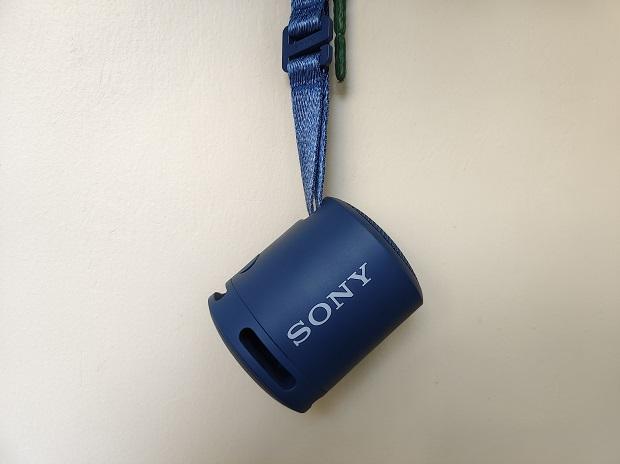
If you liked the Sony SRS-XB12, there is no reason to not like the Sony SRS-XB13 design. The speaker boasts a cylindrical body with curved grille covering the speaker on the top side for wider audio spread. It has a flat base with cutout areas right above on the lower circumference side that work as passive radiators to enhance low-end frequencies.

Speaking of the circumference (sides), the front half is clean, Sony logo visible on the left side, buttons on the right side (extending towards the back), and strap hook on the back side. There are a total of five buttons – power, Bluetooth, play/pause, volume down, volume up. As a part of its upgrade, the Sony SRS-XB13 gets a USB-C port instead of microUSB in the predecessor. Though a minor upgrade, the switch to USB-C is a relevant one that is likely to help users with smartphones and other accessories with USB-C port to cut down on wires clutter. Speaking of wires, the Sony SRS-XB13 lacks the 3.5mm audio-in port and Bluetooth is all it relies on for connectivity.

Read Complete Article

Nothing’s debut ear (1) true wireless earbuds to launch on July 27

Nothing is set to launch its first product, the ear (1), on July 27, 2021. The true wireless earbuds were earlier set to launch in June. The London-based technology startup’s founder Carl Pei recently announced on Twitter about the delay owing to some final touches before the product rollout. Nevertheless, the Nothing ear (1) finally has a launch date and it is not too far from now.

Nothing said, the ear (1) are the beginning of a long and exciting journey that will eventually expand in other product categories, including smart electronics that are expected to arrive later this year. Pei, in the blog explained the reason for choosing earbuds as the first product in Nothing’s portfolio. “…we believe the earphones market was begging for differentiation, space where we can elevate design and deliver value from day one. Additionally, as an area of hyper-growth, the earphones market will provide a fertile backdrop as we strengthen our capabilities and prepare to enter new product categories.”

ALSO READ: Carl Pei’s Nothing partners with Flipkart for Ear 1’s launch in India

In India, Nothing has partnered with home-grown e-commerce marketplace Flipkart for the ear (1) launch. This means, the Nothing’s debut ear (1) true wireless earbuds will be available exclusively on Flipkart.

For India operations, Nothing recently appointed former Samsung executive Manu Sharma, as Vice President and General Manager of Nothing India. Pei said, He (Manu) will drive the growth, business development and operations for Nothing in the country.

Read Complete Article

boAt forays into personal grooming category with sub-brand MISFIT

To introduce an exciting range of grooming and personal care products, lifestyle consumer tech brand boAt on Monday announced its entry into the personal grooming category with MISFIT.

The company unveiled MISFIT T50, a trimmer, that is available at an introductory price of Rs 899 on the Flipkart and boAt website.

“After having established our leadership in earwear and wearable category, we are all set to strengthen our lifestyle portfolio under the aMISFIT’ brand,” Aman Gupta, Co-Founder boAt, said in a statement.

“With MISFIT, we want to bring in a fresh approach to the personal care category by designing products specifically for the Millennials,” Gupta added.

T50 comes with skin-friendly titanium-coated blades, which are corrosion-resistant and offer a smooth and safe trimming experience devoid of any roughness, scratching or irritation on the skin.

These blades are easily detachable and can either be washed or just cleaned with a brush in a jiffy. A long-lasting 160-minute lithium battery ensures that your battery woes do not come in the way of you looking your best.

The MISFIT T50 has 40 length settings with 0.5 mm precision, which will always give you an even and defined trim for any look that suits your mood.

Your desired beard style, from a stubble to a consistent beard is only trim away with the multiple length setting comb function of the T50, the company said.

The company said it will also launch a range of women’s personal care products in the Indian market soon.

Read Complete Article